
|
Note: Verification of FSM eligibility post census day - Autumn School Census 2026 only If a school has not verified a pupil’s FSM eligibility by 1 October 2026 (census day), verification may still be completed on or before the 2 November. This provision applies to FSM rechecks and new FSM claims. The DfE guidance sets out which dates to record for each outcome: still eligible, newly eligible, no longer eligible, and moved to Expanded. You'll find it in the section Free School Meal eligibility (used for funding), under the heading Verification of FSM eligibility post census day, autumn school census 2026 only: We recommend you follow that section and enter the dates it gives on the student's FSM claim. Arbor sends these dates to the DfE as recorded, so after updating the claims, regenerate your census to check for any FSM errors. |
Applies to: England
From Autumn 2026, the Department for Education changed how Free School Meal eligibility is handled. Eligibility now splits into Targeted FSM and Expanded FSM, with an Other FSM option for local LA/school funding schemes. Schools must also re-verify each student's eligibility once a year, within set dates, to keep their funding.
Top Tip
If you need to add or edit FSM eligibility for lots of students at one time, see Bulk update students' Free School Meal (FSM) eligibility. Use bulk edit to change details of existing claims and Add Students with FSM can be used for both new students without an historic claim and students transitioning to Expanded FSM.
Potential Census errors relating to FSM are available here. Arbor doesn't include a built-in eligibility checker. You'll need to use another system (for example, a file from your Local Authority or the DfE's Eligibility Checking Service) to confirm whether a student should be logged as FSM before recording it here. Once your have verified their claim you can enter a Last Verified Date which should be dated on or after 1st June 2026.
DfE guidance: Free school meals: guidance for local authorities, local -authority-maintained schools, academies and free schools
Permissions
You'll need one of the following permissions to add or edit FSM eligibility from a student's profile:
- Student Profile: Background: Administer All Students — for all students
- Student Profile: Background: Administer My Students — for students assigned to you
If you can't see the option to add or edit FSM, ask your administrator to check your business roles.
Existing FSM records
Existing Free School Meal (FSM) records have been migrated over to the Targeted FSM category while you complete your verification checks. Once you’ve confirmed a claimant's eligibility under this new "Targeted" category, please remember:
Keep the record open: Do not add or close the record - do not add an end date.
Protect the start date: Keep the original FSM start date exactly as it is. Changing it will impact your Ever 6 FSM, Pupil Premium and Disadvantaged funding records.
Understanding the FSM categories
Your existing records have already been migrated to Targeted FSM.
Please note: Only Targeted FSM contributes to Ever 6 FSM, Pupil Premium and Disadvantaged status.. Recording a student as Expanded or Other FSM will not attract Ever 6 FSM, Pupil Premium and Disadvantaged status. More on how this work here: How FSM categories affect derived indicators
Targeted FSM
- This is the traditional means-tested entitlement (e.g., Universal Credit thresholds) and is the category to which pre-Autumn-2026 records were migrated. This category counts towards Ever 6 FSM, Pupil Premium and Disadvantaged status.
Expanded FSM
- This is the wider entitlement available from 1 August 2026 in England. It is eligible for meals only and does not count towards Ever 6 FSM, Pupil Premium and Disadvantaged status.
Other FSM
- Optionally can be used for additional types of FSM that schools might want to report on locally, for example, a student that a school chooses to provide free meals for, but who does not meet the Departmental eligibility criteria. Students recorded with this code will not attract FSM funding from the department. Other FSM is not collected by the DfE
Adding a new FSM eligibility from a student's profile
Go to the student's profile and scroll to the Background section. Click +Add and choose Add Free School Meal Eligibility.
Complete the slide-over:
- FSM Category — required. Defaults to Targeted FSM. Use the tooltip if you need a reminder of which category to choose.
- Start date — when this period of eligibility began.
- End date — when the eligibility ended, if known. Leave blank for current, ongoing eligibility.
- Last verified date — the date the eligibility was last confirmed with the DfE's checking service or your local authority. This should be on or after 1st June 2026.
- Next check date — auto-populated to one year after the Last verified date. You can edit this if you need to bring the next check forward.
- UK Country — defaults to England. Set this if the original claim was issued in Wales, Scotland or Northern Ireland.
- Primary Guardian Claimant (optional) — pick the guardian whose eligibility supports this claim, so the verification only shows against that guardian on the Guardian FSM Status page. Leave blank if you don't need to attribute it or don't know who they are.
Click Add Eligibility to save.
💡 Tip: If the student already has an open FSM period eg Targeted and you change it Expanded category, Arbor will automatically close the previous period by setting its End date to the day before the new Start date. You'll see a message reminding you of this.
A few things Arbor will check for you
- Expanded FSM records must have a Start date on or after 1 August 2026 — this is when the expanded entitlement begins.
- Expanded FSM is England-only. If you set UK Country to Wales, Scotland or Northern Ireland, you'll be asked to choose a different category or add an End date.
- One ongoing period at a time. Only the most recent FSM record should be left without an End date.
- Migrated Start dates are protected. If you edit a Targeted FSM record that was migrated from a pre-Autumn-2026 claim, Arbor will keep the original Start date so the student's Ever 6 history stays unbroken.
Transferring a student to a different FSM category from the student's profile
Use this when a student's eligibility moves from one category to another — for example, a Targeted FSM student becomes eligible for Expanded FSM, or a student moving from Expanded back to Targeted after a means-test reassessment.
💡 Tip: This section outlines updating singular student record from their Profile > Background section. If you wish to update this in bulk, please follow steps in Add a student with FSM (for new or changed FSM category).
In the student's Background section, click the existing FSM entry to open the slide-over. Then:
- Change FSM Category to the new value.
- Set the Start date for the new period (this is the day the new category takes effect).
- Leave End date blank.
- Enter or update the Last verified date if the new category requires a fresh check. A check with with an eligibility checking service is required. The date must be on or after 1st June 2026.
- Click Save.
💡 Tip: When you change the FSM Category, Arbor automatically closes the previous period by setting its End date to the day before the new Start date. You can amend this date if you wish.
Important
Changing the FSM Category on the Student Profile will automatically end the current claim and create a new claim under the new category. This is required if you are moving a student from one FSM category to another. This keeps the student's history accurate, so each category appears as its own period in your records.
A few things Arbor will check during a transfer
- Expanded FSM records must have a Start date on or after 1 August 2026. You can't backdate a transfer to Expanded before that.
- Migrated Start dates are protected. If you're transferring a student whose original Targeted record was migrated from a pre-Autumn-2026 claim, Arbor will keep the original Start date on the closed period so the student's Ever 6 history stays unbroken.
- No overlapping periods. The new Start date must be after the original period's Start date, Arbor will block a transfer that creates an overlap.
"Pending" FSM category
Pending is a temporary state that means Arbor doesn't yet know which FSM category a claim belongs to. Because the DfE requires an official category on every claim, you must resolve all pending records before submitting your next census.
- Carry out an eligibility verification check to confirm the correct category.
- Go to the student's profile and edit the FSM category from "Pending" to the correct one.
Ending a claim when a student is no longer eligible
Use this when a student loses FSM eligibility entirely, for example, a family's circumstances change and they no longer qualify. You're not transferring to a different category; you're closing out the existing record.
In the student's Background section, click the FSM entry to open the slide-over. Then:
- Enter an End date — the date eligibility stopped.
- Leave all other fields as they are.
- Click Save.
The record stays on the student's profile with its original Start date and category, so it still counts towards historical reporting (including Ever 6 where applicable) and appears correctly in the census.
Deleting a claim entered in error
Use Delete when the FSM record shouldn't exist at all, for example, it was added to the wrong student or recorded by mistake. If the student was genuinely eligible and has since stopped, set an End date instead (see the section above) so the history is preserved.
In the student's Background section, click the FSM entry to open the slide-over. Click Delete and confirm.
Warning: Deleting an FSM record removes it from the student's history. If the deleted record was Targeted FSM, this may reduce the student's Ever 6 count and affect Pupil Premium funding records. Double-check before confirming.
Re-verifying eligibility each year
The DfE requires schools to re-verify every student's FSM eligibility once a year, within the dates set out for each census term. Your dashboard will show a To-Do reminder ten weeks before any student's verification is due to expire, with a link straight to the Bulk Update FSM page so you can re-verify in one go. Once you have verified their claim with an Eligibility Checking Service then you can enter the last verified date from 1st June 2026.
For full guidance on re-verifying in bulk, see our article on the Bulk Update FSM page.
How FSM categories affect derived indicators
Arbor automatically calculates three derived indicators alongside the existing FSM, Pupil Premium Eligible, and Ever 6 FSM indicators. Which indicators are triggered depends on the FSM category assigned to each student's eligibility record.
What each category triggers
| FSM category | FSM | Targeted FSM | Expanded FSM | Other FSM | Pupil Premium Eligible | Ever 6 FSM | Disadvantaged |
|---|---|---|---|---|---|---|---|
| Targeted FSM | Yes | Yes | – | – | Yes | Yes | Yes |
| Expanded FSM | Yes | – | Yes | – | No* | No | No* |
| Other FSM | Yes | – | – | Yes | No* | No | No* |
* Unless the student is also eligible via another route, such as Looked After Child or Service Child status.
⚠️ Recording a student as Expanded FSM or Other FSM does not attract Pupil Premium funding, disadvantaged and does not contribute to the Ever 6 FSM indicator. Only Targeted FSM counts towards these.
Viewing derived indicators on the student profile
On a student's profile, go to the Derived Background Indicators section. The FSM row now shows the sub-category in brackets alongside the Yes value. For example, Yes (Targeted FSM) or Yes (Expanded FSM). A tooltip icon (ℹ) is also displayed; hover over it to see:
"Targeted FSM students qualify for Pupil Premium and Ever 6 FSM funding. Expanded FSM and Other FSM categories are for meal eligibility only and do not trigger additional funding."
At the top of the student profile, in the header, an active FSM record displays as short indicator pills. The [FSM] pill appears for any active FSM record. An additional sub-category pill appears alongside it:
| Active FSM record | Pills shown in header |
|---|---|
| Targeted FSM | [FSM] [TFSM] |
| Expanded FSM | [FSM] [EFSM] |
| Other FSM | [FSM] [OFSM] |
Demographics - filtering students by FSM category
You can filter any student list by sub-category. From any list page, open the Students in... filter and look for the new options:
- Targeted FSM
- Expanded FSM
- Other FSM
Inverse filters — for example, Not Targeted FSM — are also available.
To see all students with any active FSM record, go to Students > Demographics & Educational Needs > Free School Meal Students. The page total covers all three categories combined. Use the sub-category filters to break this down further.
FSM Category in Custom Report Writer
You can include FSM data as columns or filters in the Custom Report Writer, making it easy to build reports that break students down by their FSM sub-category, track eligibility dates, and produce category headcounts.
Go to School > Custom Report Writer and create a report using the Students or Student Meal Records focus.
In the field selector when adding columns, search for 'FSM' to find all of the fields below.
Adding FSM Category to a report
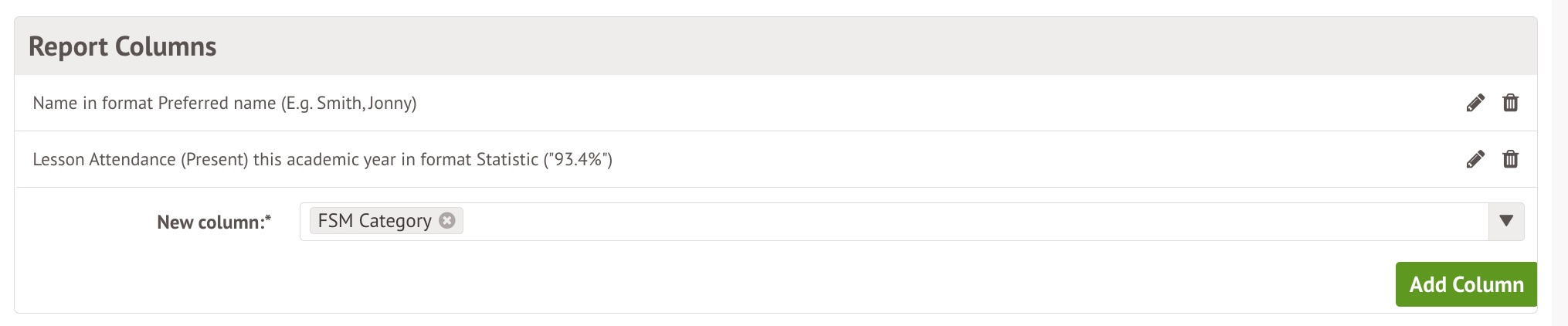
Under the Meals category, add FSM Category as a column with the green button to show each student's category - Targeted FSM, Expanded FSM, or Other FSM - alongside their meal data.
You can also:
- Filter by FSM Category to limit the report to students in a specific category.
- Group by FSM Category to subtotal meal data by category in a single view.
Reporting on FSM eligibility dates and verification
In addition to Category, you can report on a student's FSM eligibility dates. In the field selector, these appear under Demographics (Background):
- FSM Eligibility (Current Start Date) — when the student's current eligibility began
- FSM Eligibility (Current End Date) — when it ends, if an end date is set
- FSM Eligibility (Current Dates) — the start and end shown together as a date range
- FSM Eligibility (Last Verified Date) — the date the student's eligibility was last confirmed with the Eligibility Checking Service. This should be on or after 1st June 2026.
Add any of these as a column with the green button.
You can also Filter and Group reports by FSM Eligibility (Current End Date), FSM Eligibility (Current Start Date) and FSM Eligibility (Last Verified Date), but not by FSM Eligibility (Current Dates).
💡 Tip: Filters are especially useful for keeping verification up to date — filter by FSM Eligibility (Last Verified Date) to find students who haven't been verified since a given date and may be due a re-check.
Reporting on FSM sub-categories as demographics
Each FSM sub-category (Targeted, Expanded, or Other) is also available as a demographic, which is useful when you want a simple Yes/No flag or a headcount rather than a category column. In the field selector, look under Demographics.
| Demographic (Yes/No column or filter) | Count field (for totals) |
| Targeted FSM? | Targeted FSM Student Count |
| Expanded FSM? | Expanded FSM Student Count |
| Other FSM? | Other FSM Student Count |
- Add a demographic as a column to flag which students fall into that category, or use it as a filter to limit the report to just those students.
- Add the matching Student Count field to get the total number of students in each category — handy for a summary or dashboard-style report where you have grouped students.
4061 - A valid last verified date must be provided for each open period of FSM eligibility.
If you do want to double-check if you are missing Last Verified dates for students with an ongoing claim or if you have any claims with an verified date after census day, you can:
- Head to School > Data > Data Quality > Students > Demographics > Bulk Update FSM
- Use the Column Filter to filter the FSM End Date column to only show Ongoing claims (see more on filtering columns here)
- Then filter the Last Verified date column to only show (Blank) columns and dates after census day
- Any claims with a start date before census day will need a last verified date added (banks) or adjusted (if the date was after the census). Just click on the student to add this on the slide-over or use the bulk action to do multiple.
4063 - Historic Free School Meal records must have a valid category other than Pending.
This error can appear when a student has a historic Free School Meal record (one with an end date) where the FSM category is still Pending. The census needs the category the student actually held at that time.
More information on the Pending status can be found here: "Pending" FSM category.
What to do if you see this error
- Open the student's profile and scroll down to Background.
- Click the Free School Meal tab. A slide-over will then open.
- In the Eligibility history section, click the historic record that has an end date. Its FSM category will show as Pending.
- Click Edit and choose the category the student held at that time. This is likely to be Targeted.
- Click Save Changes. Repeat for any other past FSM records for the same student.
-
Regenerate the census. The error should clear.
4064 - The FSM expansion cohort started on 1 August 2026, so the expanded FSM could not begin earlier than this date
The DfE introduced Expanded Free School Meals (EFSM) starting from the 2026/27 academic year (1 August 2026) to cover pupils in households receiving Universal Credit regardless of earnings
Why the error should not flag in Arbor at all
What to do if you see this error
In late September 2026, the DfE issued a fix for an issue with their validation rules that was causing this error to flag for all students with EFSM. If you see this error, please regenerate your census, and you should see it disappear.
FAQs
What happened to my school's existing FSM records?
They've been automatically migrated to Targeted FSM, keeping their original Start dates, so Ever 6 FSM, Pupil Premium and Disadvantaged status is preserved. You don't need to do anything to migrate them, but you'll need to add a Last verified date before the next Autumn census.
Is there a quick way to update multiple students at one time?
You can bulk update FSM dates through the Bulk Update FSM page. Read more on how to use this page here: Bulk update students' Free School Meal (FSM) eligibility
Comments
I would like to run a report that shows last verified date and next check date for free school meal children, how can I pull these two dates through on to a report
Hi Nicola, it currently isn't possible to report on this in bulk. If you'd like us to consider this in future, please see how to submit this to our product team here.
Article is closed for comments.